EliteRange on Apple Watch: your firing solution on your wrist
EliteRange is a free ballistic app for Apple Watch, the companion of the iPhone app: firing solution on the Digital Crown, courses target after target, an anti-cant level and the stage timer. Your iPhone stays in your pocket, even offline, with an Apple Watch Series 4 or later.

Describes version 2.5.0, checked November 22, 2026.
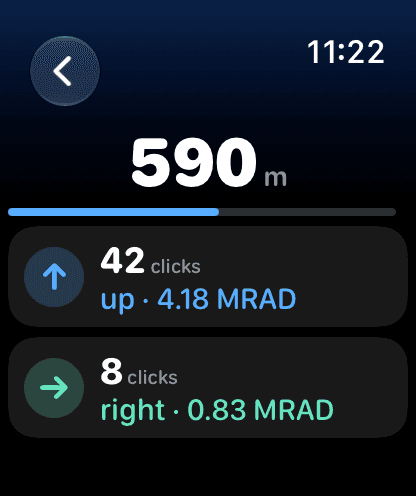
Three tools right from the watch home screen
The app opens on three cards, Calculator, Courses and Level, and reopens on the last tool you used. Values, units and language match the iPhone app. The watch computes nothing: it shows the solution sent by the iPhone. Weather, profiles and courses are set on the iPhone.
- Calculator: the firing solution set on iPhone
- Courses: your targets during the match
- Level: is the rifle canted?
The firing solution, with distance on the Crown
Distance, elevation and windage are shown in clicks and in angle, with the direction to turn. The Digital Crown changes the distance, using the step and limits of your trajectory table. When you change the distance on iPhone, the watch follows.
- iPhone in your pocket, even offline: the watch keeps the last solution it received
- Solution older than 30 minutes: an orange clock shows its age
Your courses, target after target, without pulling out the iPhone
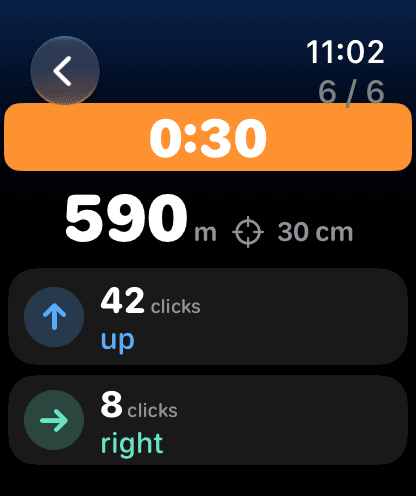
Pick a course saved on iPhone, then move from one target to the next: distance, elevation and windage, in the same order as on iPhone. On the barricade, the correction for the next target is on your wrist.
- The Crown, a tap or a horizontal swipe changes target
- The left edge goes back
An anti-cant level, with the watch mounted on the rifle
Mount the watch on the rifle, in portrait. The whole screen is green when the rifle is level, orange then red when it tilts, with the side to correct.
- The Crown picks the sensitivity
- A long press sets the zero
- The Apple Watch guide in Settings lists the watch settings that keep the level on screen
The stage timer starts with a long press
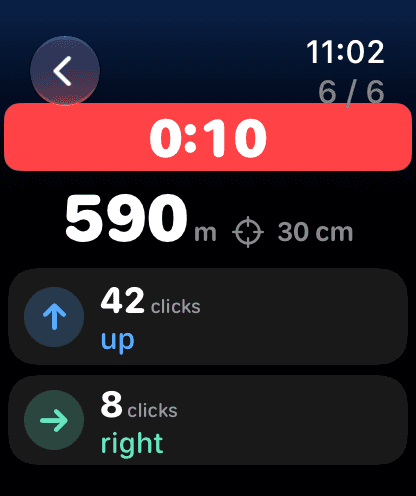
On a course’s targets screen, a long press shows “Shooter ready?”; a second long press says “Ready”. “Standby” lasts a random 1 to 4 s, then a vibration starts the countdown. The banner goes from green to orange at 30 s, then red at 10 s, with a vibration at each step and at zero.
- Duration: the course’s duration on iPhone, 105 s by default
- Long press during the countdown: stop, elapsed time frozen in grey
- Vibrations scheduled from “Standby”: they arrive even if the watch goes to sleep
- The Crown and taps stay active to change target
Installed from the iPhone’s Watch app
Open the Watch app on iPhone and install EliteRange from the list of available apps. The iPhone app requires iOS 18.4 or later. In its Settings, the Apple Watch section explains installation, the three tools and the orange badge.
- Apple Watch Series 4 or later, on watchOS 9 or later
- No Android app: iPhone and Apple Watch only
Frequently asked questions
Which Apple Watch do I need?
An Apple Watch Series 4 or later on watchOS 9 or later, with EliteRange installed on the iPhone. You add it to the watch from the iPhone’s Watch app.
Do I need to take out my iPhone during a match?
No. The watch keeps the last solution it received from the iPhone and works with the iPhone in your pocket, even offline. Past 30 minutes, an orange clock shows how old the solution is.
Does the stage timer run on the watch and the iPhone at the same time?
No. It runs on the device where you start it, iPhone or watch. On the watch it vibrates at the start, at each step and at zero, and stays accurate if the screen turns off.
How do I set up the anti-cant level?
Mount the watch on the rifle in portrait, then set the zero with a long press. The Crown picks the sensitivity.
Does the Apple Watch app cost anything?
No. EliteRange is free and will stay free, on iPhone and on the watch: no account, no ads, no tracking.
See also
- Ballistic calculator: firing solution and wind, in clicksElevation and windage in clicks, two-zone wind, gusts, automatic weather and truing: EliteRange’s free ballistic calculator for iPhone.
- PRS course and reticle: every target right where to hold itSave the targets of a PRS course, recompute them for current weather and see each one in the reticle, right where to hold. Free, on iPhone.
- PAR Timer and stage timer, just like a matchFree PAR timer on iPhone: random start, shots detected by the microphone, splits. Plus a PRS stage timer that turns orange at 30 s and red at 10 s.
Try it on your rifle
Free · iOS 18.4 or later · No account, no ads