Ballistic range table and trajectory, distance by distance
EliteRange’s Trajectory screen computes a ballistic range table distance by distance: velocity, energy, elevation, windage and the correction for one unit of wind. The charts compare up to three loads of the same caliber, and the range card can be exported. The app is free, on iPhone.

Describes version 2.5.0, checked November 22, 2026.
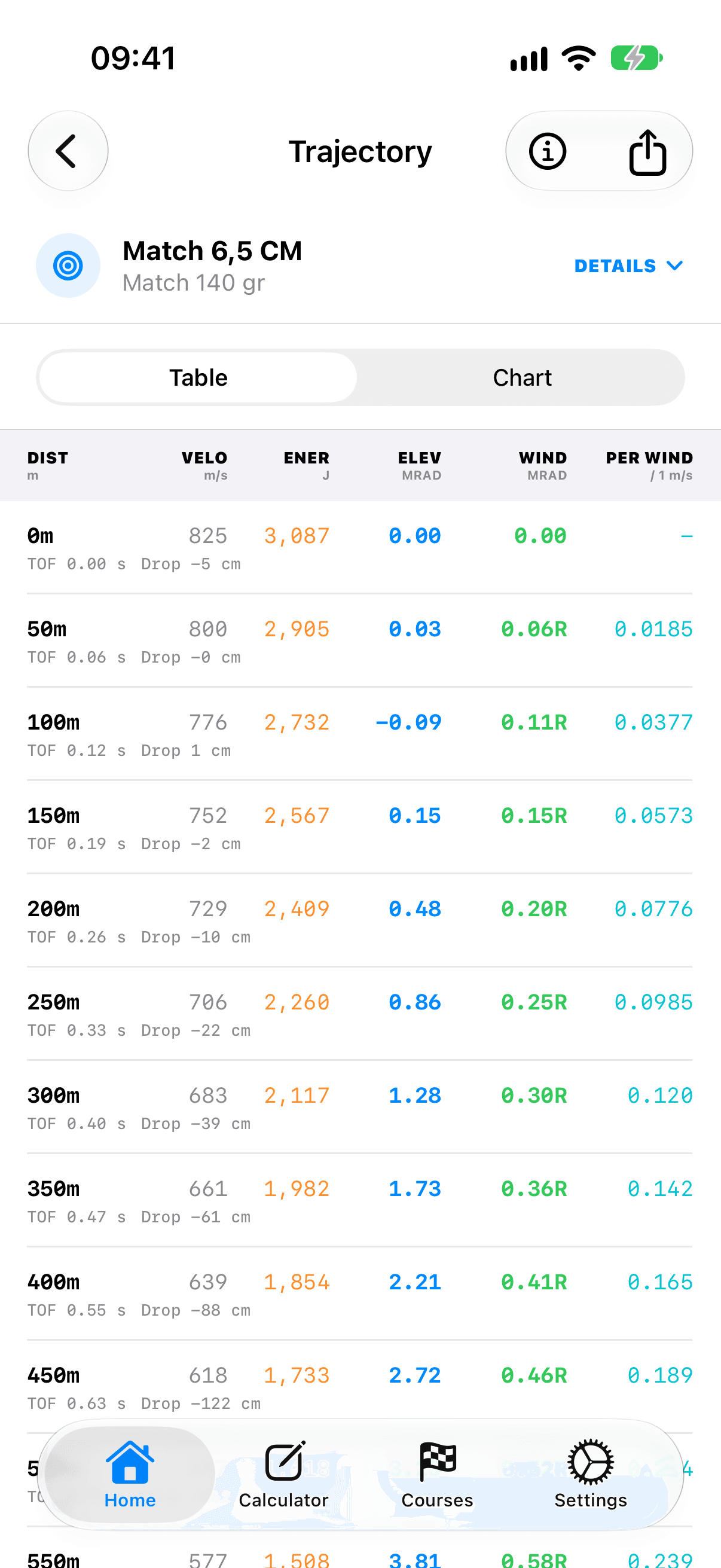
Every correction, distance by distance
The table follows the range and step set in Settings, in meters or yards. Each row gives distance, remaining velocity, energy, elevation and windage. Windage is the correction to dial, as on the firing solution, with its letter: “1.2 R” means dial 1.2 right.
The sub-line adds time of flight and uncorrected drop. An orange “Transonic” dot marks the Mach 1.2 to 0.8 window, where airflow becomes unstable: treat it as the practical limit of your load.
- Distance, velocity, energy, elevation, windage
- L or R letter on windage
- Time of flight and drop on the sub-line
- Transonic zone flagged
The correction for one unit of wind, multiplied in your head
The “Per wind” column gives the correction for a single unit of full-value crosswind: 1 m/s, 1 mph or 5 km/h depending on your settings. It does not depend on the wind you entered: multiply it in your head by the day’s wind, 3 times the value for 3 m/s.
It has no L or R letter because it holds for either side: dial toward the side the wind comes from. For an angled wind, count roughly the sine of the angle, about 0.7 at 45°.
- One unit of full-value crosswind
- No letter: dial toward the side the wind comes from
- Carried onto the range card
The trajectory as charts
The elevation chart shows the trajectory from the side, with corrections applied, against the line of sight. The windage chart shows the bullet’s lateral drift in cm or inches, opposite to the correction: that is expected. An orange band marks the transonic zone when the bullet reaches it within the range.
Pinch to zoom, tap the curve to read a value.
- Elevation and lateral drift
- Pinch to zoom
- Tap to read a value
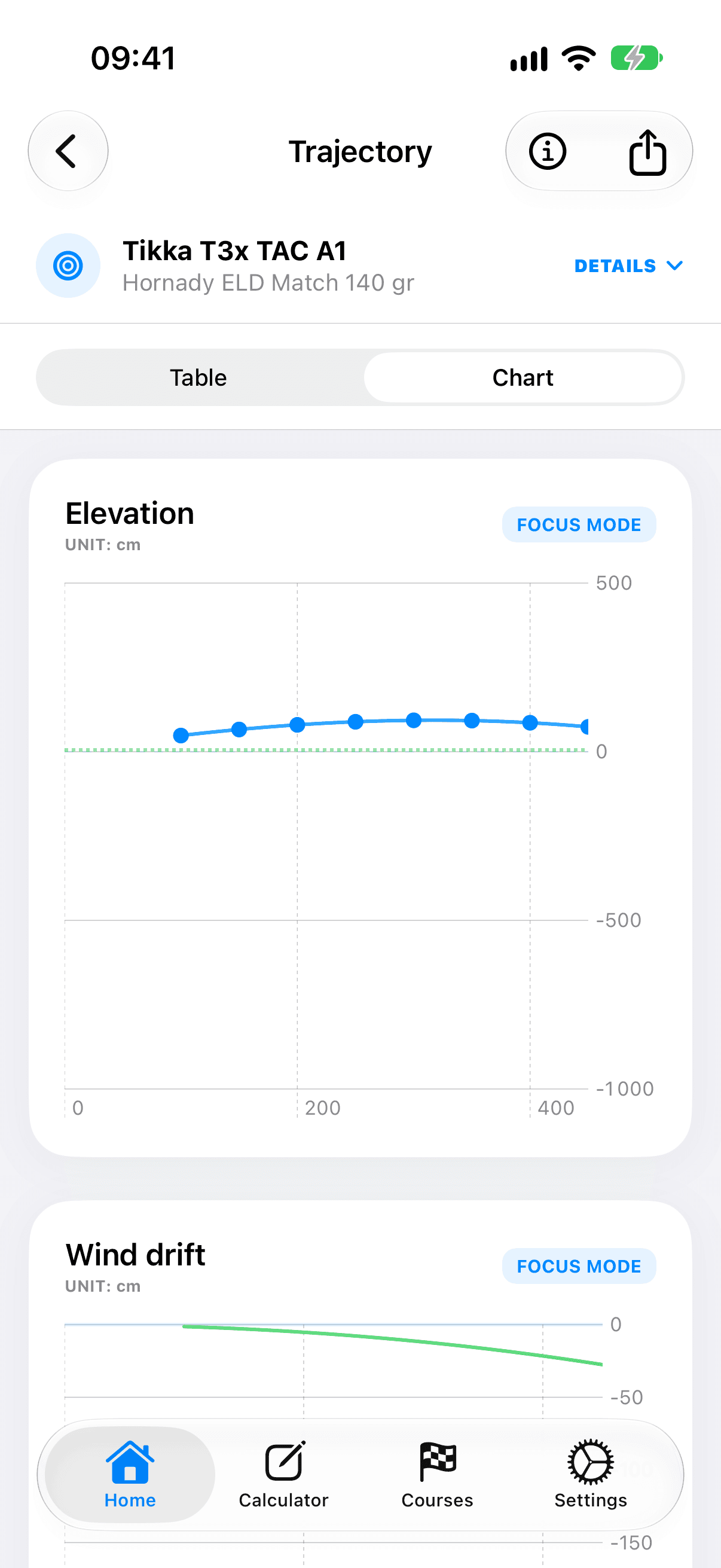
Up to three loads on the same curves
“Compare with...” overlays one or two other loads on yours, three curves at most. Only complete loads of the same caliber as the rifle are offered. Every curve is computed in the same conditions and with the same zero.
A dashed line marks where each bullet drops below Mach 1.2. The table is hidden during the comparison and comes back when you exit it; nothing is saved. Comparing a load with its copy, after changing a single value, shows the effect of that change.
- Same caliber as the rifle
- Same conditions and same zero
- Nothing is saved
A range card to tape to your stock
The share button produces a stripped-down range card: distance, elevation and windage with its letter. When the “Per wind” column has been computed, it prints as a fourth column with its unit. The card holds 40 rows at most: narrow the range or widen the step if your table is longer.
- Three columns, four with “Per wind”
- 40 rows at most
- Ready to print or share
Frequently asked questions
Why does the “Per wind” column have no L or R letter?
Because it holds for a wind from either side. Dial toward the side the wind comes from, and multiply the value by the day’s wind speed.
What does the “Transonic” dot mean?
The bullet is crossing the Mach 1.2 to 0.8 window, where airflow becomes unstable and accuracy degrades. Treat that distance as the practical limit of your load.
Can I compare two calibers?
No. The comparison only offers complete loads of the same caliber as the rifle, three curves at most. The table is hidden while you compare.
Why is my range card cut short?
Export stops at 40 rows to stay readable. Narrow the range or widen the step in Settings.
EliteRange is a calculation aid. Always stay in control of your shot and follow safety rules.
See also
- Ballistic calculator: firing solution and wind, in clicksElevation and windage in clicks, two-zone wind, gusts, automatic weather and truing: EliteRange’s free ballistic calculator for iPhone.
- Rifles, loads and handloading: your profiles and the bullet catalogRifle and load profiles, a bullet catalog with ballistic coefficients, chronograph series, temperature sensitivity and zero offset. Free on iPhone.
- PRS course and reticle: every target right where to hold itSave the targets of a PRS course, recompute them for current weather and see each one in the reticle, right where to hold. Free, on iPhone.
- EliteRange on Apple Watch: your firing solution on your wristOn Apple Watch: firing solution on the Digital Crown, courses target after target, anti-cant level, stage timer. iPhone stays in your pocket, offline too.
Try it on your rifle
Free · iOS 18.4 or later · No account, no ads