Ballistic calculator: firing solution and wind, in clicks
EliteRange’s ballistic calculator gives elevation and windage in clicks and in angle, with the direction to dial, for long range, PRS and sport shooting. It accounts for wind, in two zones if needed, weather and ammunition temperature, and works offline. It is free, on iPhone and Apple Watch.

Describes version 2.5.0, checked November 22, 2026.
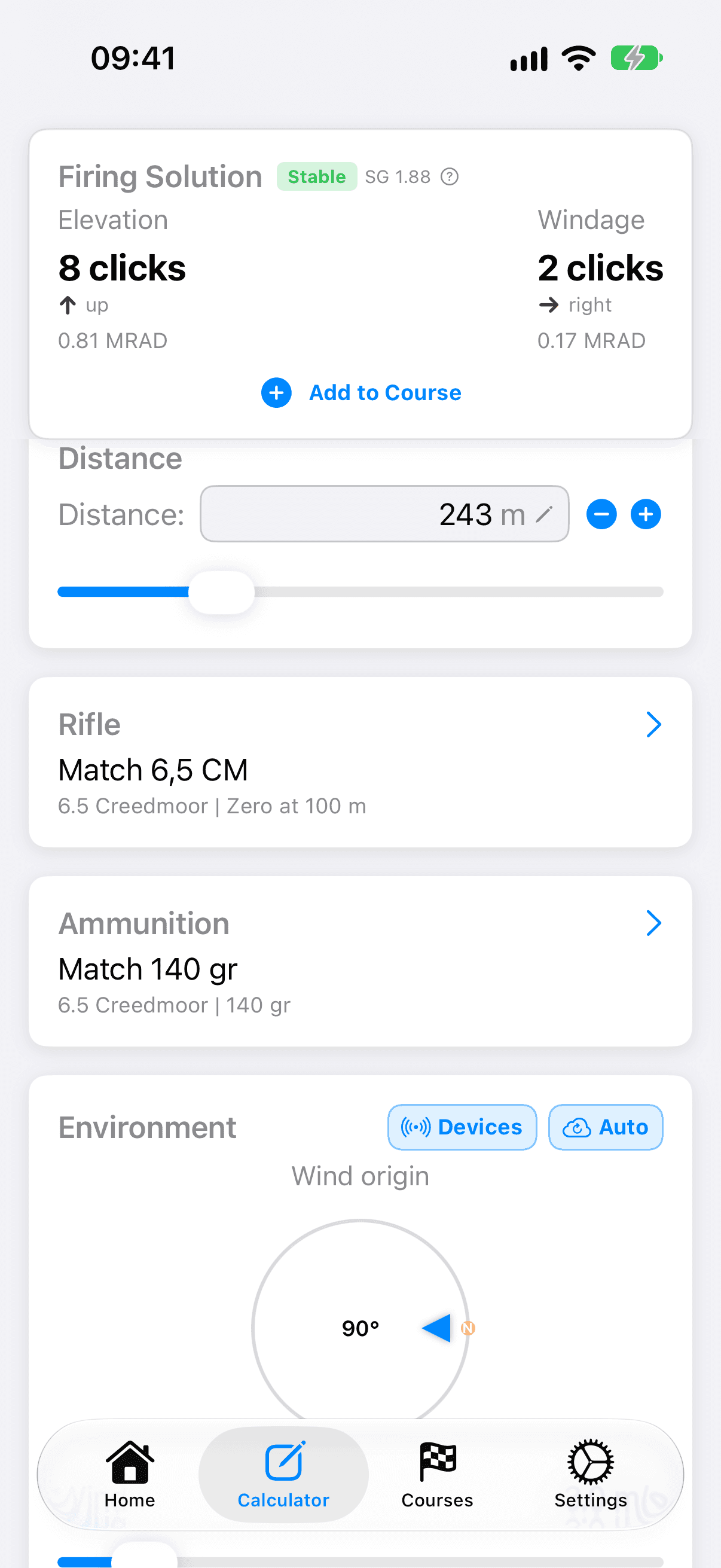
The correction to dial, in clicks and in the right direction
The “Firing solution” card gives elevation and windage in clicks and in angle, mrad or MOA, in your turrets’ unit. A colored arrow next to Elevation and Windage shows which way to dial. The bullet’s gyroscopic stability is stated in one word.
Set the distance with the keyboard, the + and - buttons or the slider. On a slope, the horizontal distance is shown rounded, in yards if you work in yards; the (i) button explains the cosine rule and why the firing solution goes further than it.
- Clicks and angle in your turrets’ unit (mrad or MOA)
- Direction to dial shown by a colored arrow
- Gyroscopic stability (SG) in one word
- Distance by keyboard, buttons or slider
Current weather, or the values you enter
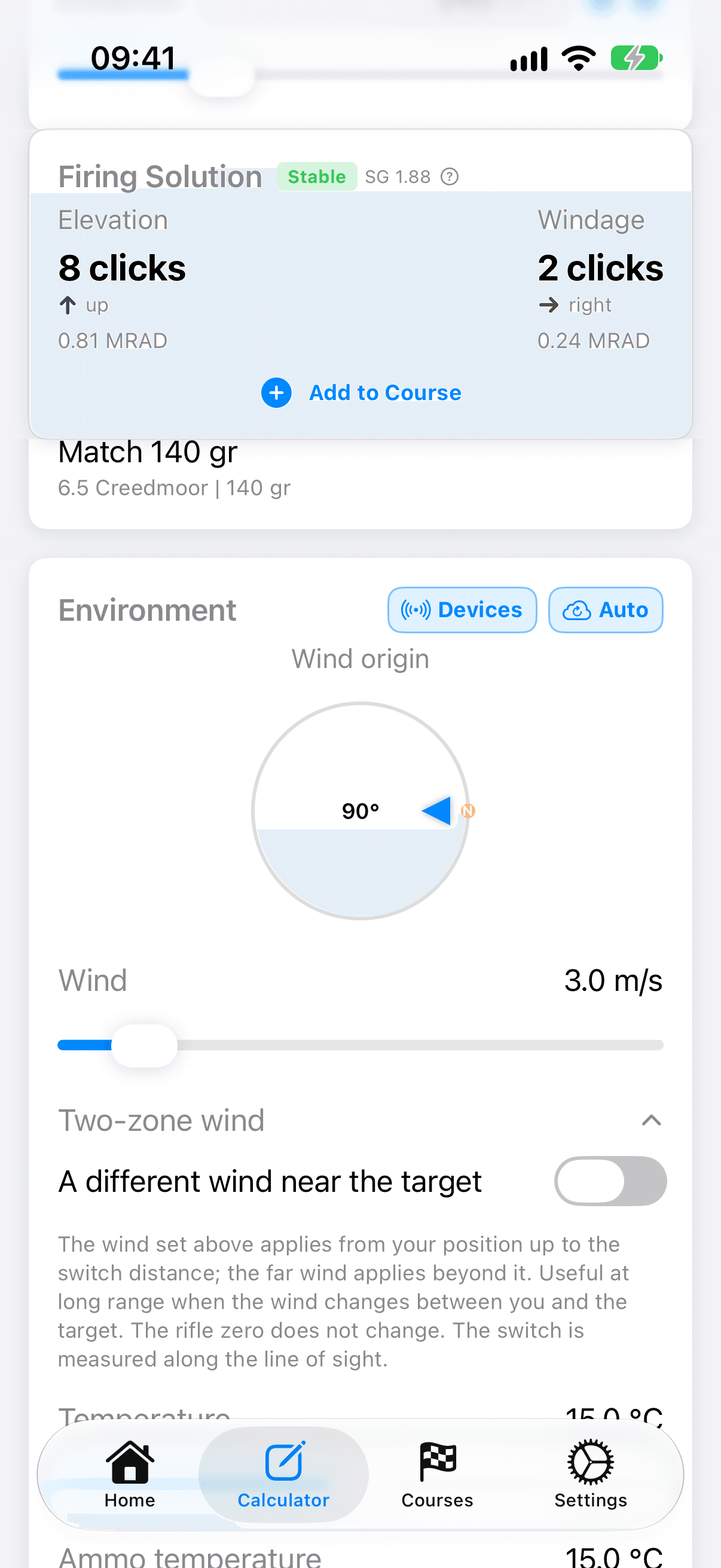
The wind dial shows where the wind comes from relative to your line of fire. The Auto button fetches temperature, pressure and local wind from Apple weather; it needs a connection and location access. Every value can also be typed by hand, and the calculation itself runs on the iPhone, offline.
When the load has a temperature sensitivity set, ammunition temperature corrects muzzle velocity: the velocity actually used appears under the slider, with the applied difference. After Auto, that temperature follows the air temperature; adjust it if your rounds sat in the sun or just came out of a cooler.
When the wind comes from Auto and the forecast gust exceeds the average wind, an orange “In gusts” line gives the windage at gust speed, in clicks. The solution above stays computed with the average wind; tap the line for how to handle the gust. It disappears if you enter the wind by hand, if a Bluetooth device (beta) provides it, or if the gust no longer exceeds the average wind.
- Apple temperature, pressure and wind, or manual entry
- Velocity corrected for ammunition temperature
- Gust windage, only with wind from Auto
One wind at your position, another near the target
At long range, the wind near the target is not the wind at your firing point. The “Two-zone wind” section, collapsed and off by default, adds a second dial and a second speed for the far wind, with a switch distance: the near wind applies up to it, the far wind beyond it.
The switch is automatic, at half the shot distance, or entered; a value outside the shot distance is refused with the reason. The rifle zero does not change, and with the section off the solution is the same as before. The two-zone calculation was compared with an independent integrator: 0.001 mrad apart at 800 m, on one test case.
- Calculator only: courses keep a single wind
- No “In gusts” line while both zones are active
- Collapsed, one line sums up what the calculation applies
What the calculation accounts for
The trajectory is integrated step by step. The calculation accounts for gravity, drag, air density, humidity, wind, site angle, Coriolis effect, spin drift, aerodynamic jump and ammunition temperature.
Drag follows your bullet’s model: G1, G7 or RA4, up to 5 velocity and BC pairs, or a Doppler radar drag curve. A calculated curve is never presented as radar-measured. The transonic zone is flagged in the range table.
- G1, G7 and RA4 drag models
- Up to 5 velocity and BC pairs per load
- Coriolis with location and azimuth turned on in Settings
A calculation trued on your own shots
If the impact does not land where the calculation says, truing starts from the offset of your group: set your scope to the solution, shoot 5 rounds, measure the offset between the aim point and the centre of the group, in cm, inches or clicks, and say whether it is lower or higher. The app works out the corrected muzzle velocity or BC, with no drop to calculate. It starts from the load’s sheet, which a long press on the Ammunition card opens directly. For a load with several BCs, it only offers velocity.
When target analysis has measured at least 3 cold-bore first shots for your rifle, and their mean offset exceeds their spread and is at least half a click, the card adds a “First shot” line with the correction in clicks. It is a reminder: the rifle zero is never changed.
- Muzzle velocity or BC trued from the offset of your group
- “First shot” line after 3 measured cold-bore shots
- Otherwise, no line
Aim with the iPhone, report a discrepancy
The “Aim at the target” button opens the rear camera: put the reticle on the target and zoom if needed. “Capture”, active only when the image is steady, fills the site angle and the direction, if direction is turned on in Settings. Near metal the compass is not reliable and only the angle is taken.
The speech-bubble button in the top bar sends a problem, an idea, a question or a review, with a screenshot you can remove in one tap. On the calculator, the rifle, the load and the solution are attached; your location, never.
- Site angle to 0.1°, captured on a steady image
- Direction only when the compass is reliable
- Feedback from the screen, email address optional
Frequently asked questions
Does the calculator work without a network?
Yes. The calculation runs on the iPhone, which sends the solution to the watch. Only the Auto button needs a connection and location access; without it, enter the weather by hand.
Does two-zone wind apply to courses?
No. It applies to the calculator only; a course keeps a single wind for all its targets.
Why don’t I see the “In gusts” line?
It only exists when the wind comes from Auto (Apple weather) and the forecast gust exceeds the average wind. It disappears if you enter the wind by hand or if a Bluetooth device (beta) provides it, and is not computed while two-zone wind is active.
My hits don’t land where the calculation says. What should I do?
Set your scope to the solution, shoot a group of 5 rounds at a known distance, measure the offset between the aim point and the centre of the group, then open truing in the load’s sheet: it corrects muzzle velocity or BC for the following solutions. A load with several BCs is trued on velocity only.
Is the calculator free?
Yes, and it will stay free: no account, no ads, no tracking, and your data stays on your iPhone. It requires iOS 18.4 or later; there is no Android app.
EliteRange is a calculation aid. Always stay in control of your shot and follow safety rules.
See also
- Rifles, loads and handloading: your profiles and the bullet catalogRifle and load profiles, a bullet catalog with ballistic coefficients, chronograph series, temperature sensitivity and zero offset. Free on iPhone.
- Ballistic range table and trajectory, distance by distanceRange table distance by distance with the correction per unit of wind, trajectory charts, load comparison and an exportable range card. Free on iPhone.
- PRS course and reticle: every target right where to hold itSave the targets of a PRS course, recompute them for current weather and see each one in the reticle, right where to hold. Free, on iPhone.
- Hit chance: what each target forgivesFor each target of a course: the wind error the target forgives and, with its size, a measured group and a chronograph series, your hit probability. Free.
Try it on your rifle
Free · iOS 18.4 or later · No account, no ads