Hit chance: what each target forgives
For each target of a course, EliteRange shows the wind error it forgives and, with the target size, a measured group and a chronograph series of at least 5 shots, the hit chance, which counts your wind and distance uncertainties if you enter both. Free, on iPhone.

Describes version 2.5.0, checked November 22, 2026.
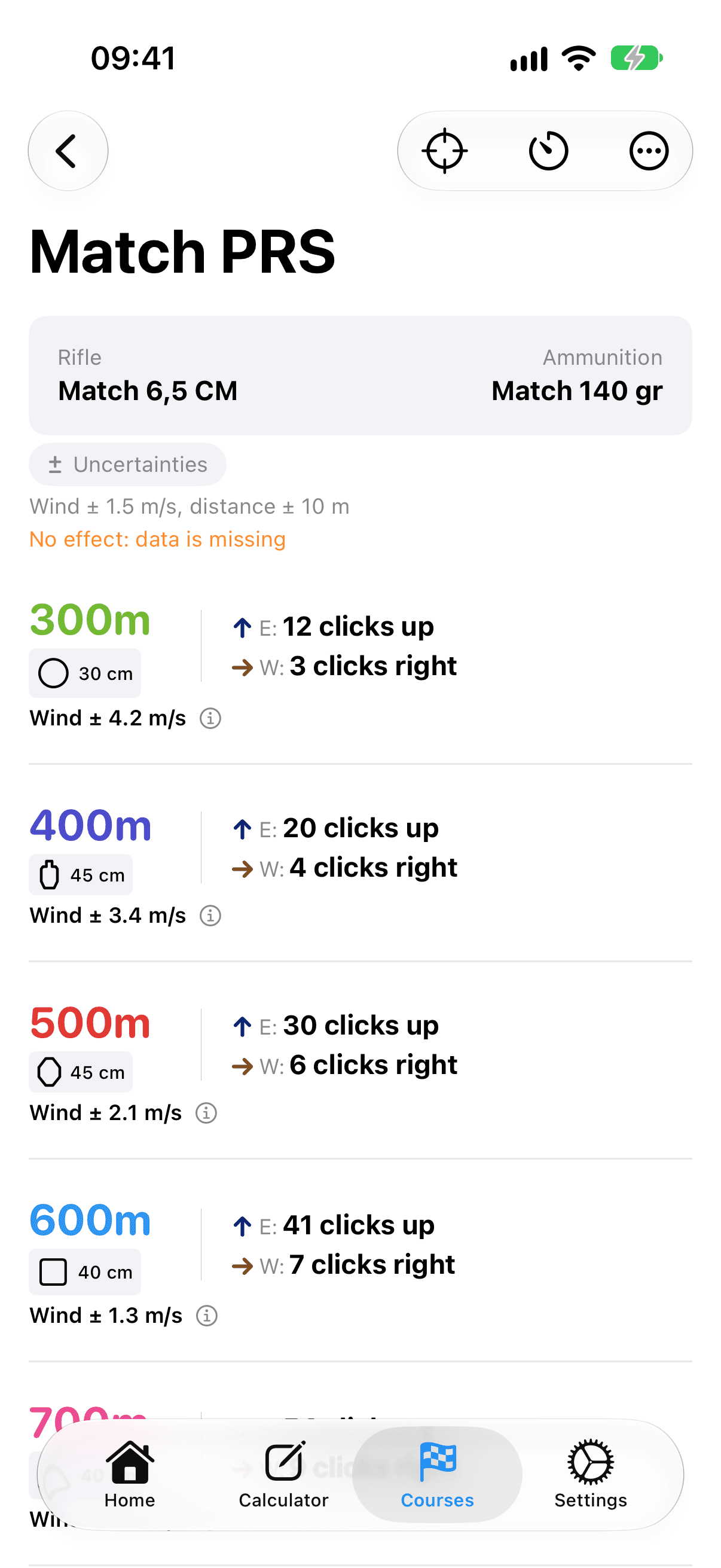
“Wind ± x m/s”: the wind error the target forgives
On a course target’s row, “Wind ± 1.2 m/s” (for example) gives the crosswind error the target tolerates before the impact leaves it, in the wind unit of your settings.
This line only needs the target size to be saved. With no size, there is no line: no default value stands in. The (i) button next to it opens a sheet that explains it.
- Computed by the ballistic engine for the target, load and conditions
- In the wind unit chosen in Settings
- Missing if the target size is not saved
“Hit n%”: the share of shots that stay on target
“Hit 70%” (for example) gives the share of shots that stay in the target from the dispersion of the rifle and load alone, with the wind assumed perfectly read.
Besides a rifle and a load on the course, it needs real data: the target size, a measured group for this rifle and load (target analysis, validated scale) and a chronograph series of at least 5 shots. If one is missing, the line does not appear. The percentage is rounded to 5% and bounded between 5 and 95%: it is neither a promise nor a 100%.
- Target size saved
- Group measured by target analysis, validated scale
- Chronograph series of at least 5 shots
Your wind and distance uncertainties count too
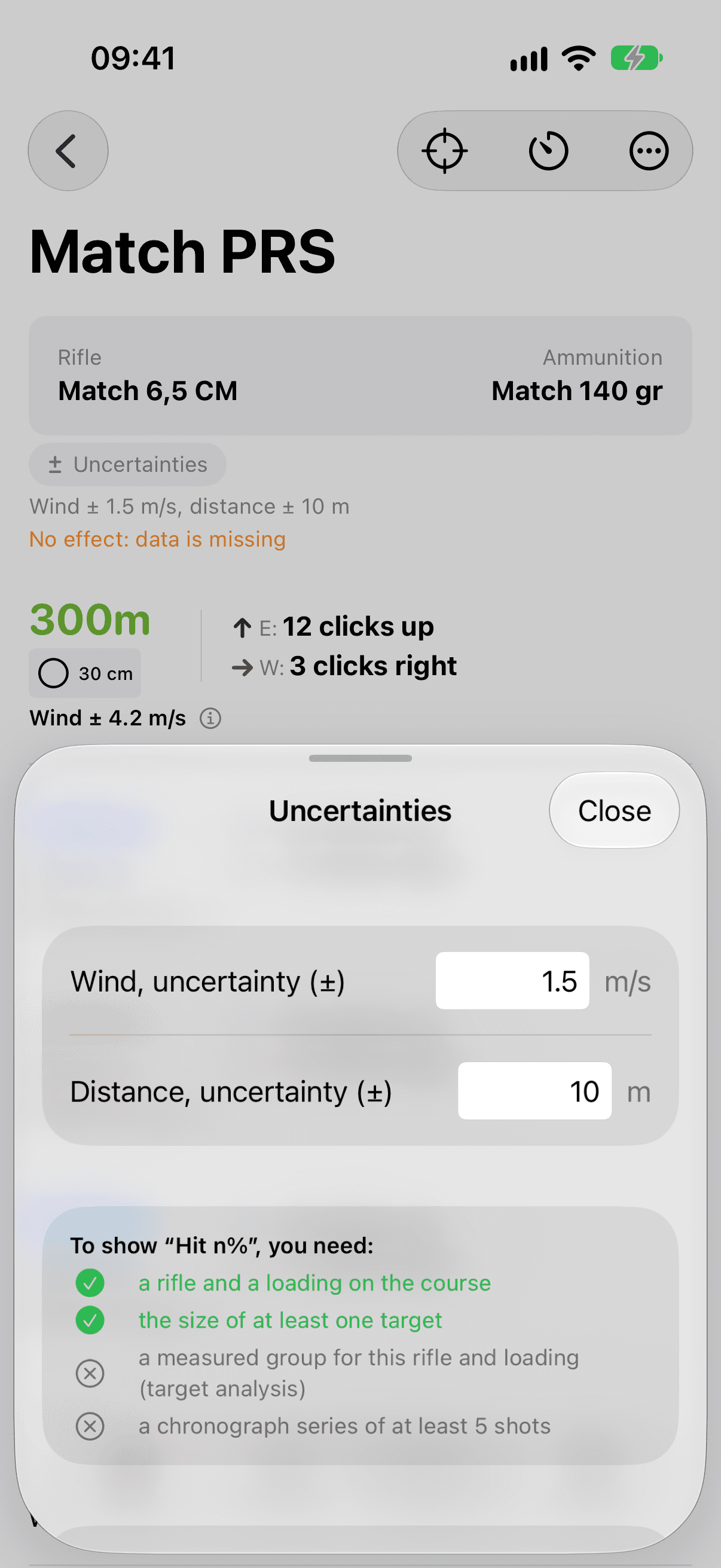
The “± Uncertainties” button at the top of the course table asks for two values for the whole course: your uncertainty on the wind (20 m/s at most) and on the distance (200 m at most), for example ± 1.5 m/s and ± 10 m. Once both are entered, “Hit n%” adds them to the rifle’s dispersion and the velocity spread: this is your real hit chance, lower as soon as wind or distance are poorly known.
When the wind costs at least 5 points, a line says so (“wind costs 30 points”, rounded to 5): reading the wind better would win them back. The sheet also lists what “Hit n%” needs, with a check or a cross for each point. In the screenshot, two points are missing: the course shows “No effect: data is missing” and no percentage.
- An empty field is never counted as zero
- Zero means “known exactly”: with two zeros, the percentage does not change
- A negative, out of range or unreadable value is flagged and ignored
Uncertainty ellipses around every impact
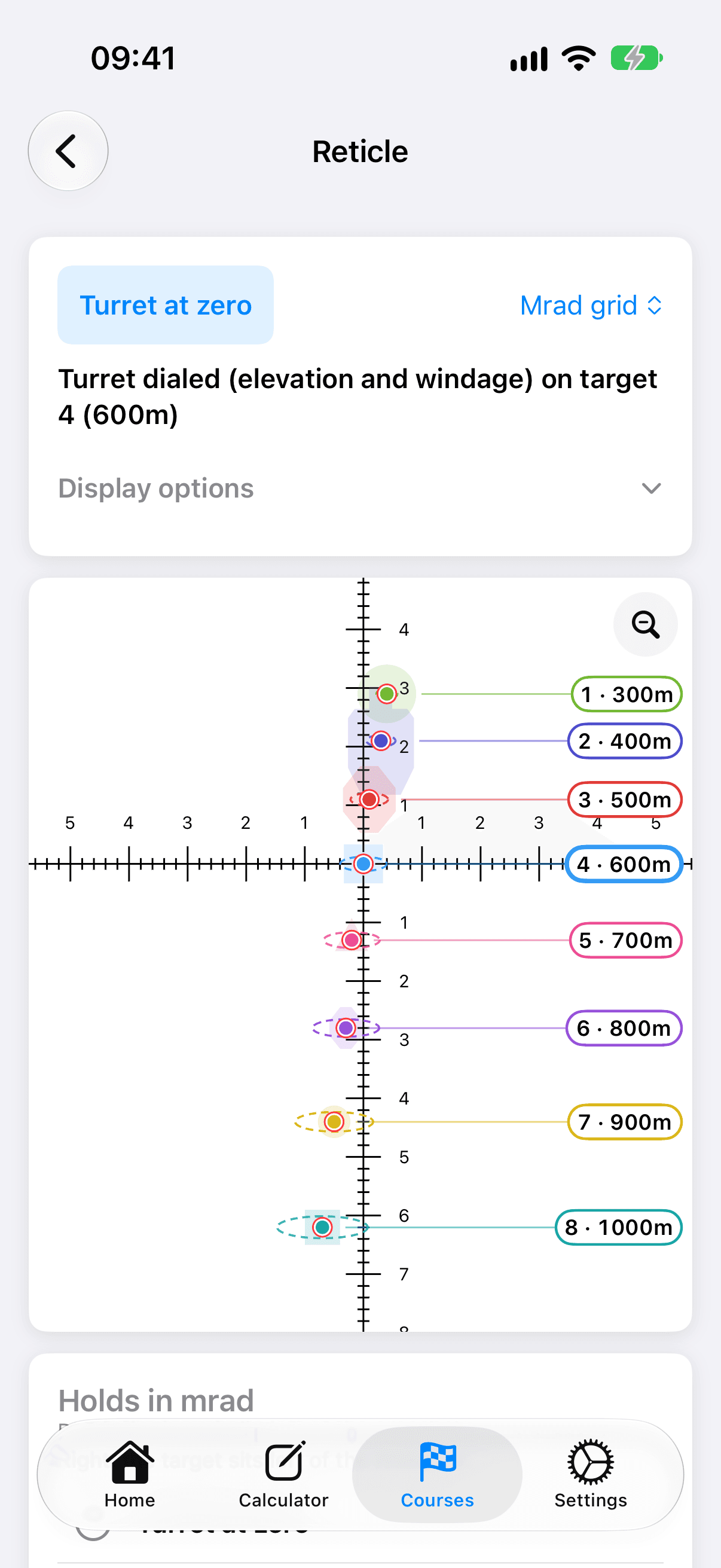
In the course reticle, the “Uncertainties” switch in the display options draws a dashed ellipse around each impact. Its width is your wind uncertainty, its height your distance uncertainty.
The switch only shows once both values are entered. They are stored per course and go away with it.
- Width: wind uncertainty
- Height: distance uncertainty
- Switch shown only once both values are entered
Your real shots suggest a truing
After shooting a target, “Note the setting used” saves in clicks the elevation that actually hit, with the temperature, pressure, humidity and wind of the moment. It is optional.
When at least 3 targets, on at least 2 distances 100 m or more apart, show an offset in the same direction and larger than one click, a banner says so and offers “Open truing”. Truing opens pre-filled with these shots and adjusts the muzzle velocity of the course’s load; you confirm. Inconsistent or too few offsets: no proposal.
- At least 3 targets on 2 distances 100 m apart
- Offset in the same direction and larger than one click
- Nothing changes until you confirm
Frequently asked questions
Why does “Hit n%” not show on my targets?
A piece of data is missing: a rifle and load on the course, target size, a measured group for this rifle and load, or a chronograph series of at least 5 shots. The “± Uncertainties” sheet checks what is there and marks what is missing.
Why does the percentage never reach 100%?
It is rounded to 5% and bounded between 5 and 95%. It is an estimate from your dispersion and your uncertainties, not a promise.
What do I enter if I know the distance exactly?
Enter 0: zero means “known exactly”. An empty field is not counted, and with only one field filled in, the line stays the dispersion-only one.
Does the calculator show the hit chance?
No. The calculator has no target size entry; “Wind ±” and “Hit n%” only exist in courses.
Is two-zone wind taken into account?
No. A course keeps a single wind; the two zones only apply to the calculator.
These values are computed by the ballistic engine for a given target, conditions and load. They replace neither updating the course nor your own wind call.
See also
- PRS course and reticle: every target right where to hold itSave the targets of a PRS course, recompute them for current weather and see each one in the reticle, right where to hold. Free, on iPhone.
- Matches and statistics: where do you lose points?Count your hits during the stage, keep every match and see where you lose points: distance, target size, wind, first shot. On iPhone.
- Target analysis: your group measured in cm and MOATake a photo of your target: hits detected, group measured in cm, inches and MOA, scope correction in clicks, progress tracked. Free, on iPhone.
- Bluetooth devices, chronograph series and camera aimingKestrel weather stations, rangefinders and radar over Bluetooth (beta), imported chronograph series, camera aiming: your measurements, no copying.
- Rifles, loads and handloading: your profiles and the bullet catalogRifle and load profiles, a bullet catalog with ballistic coefficients, chronograph series, temperature sensitivity and zero offset. Free on iPhone.
Try it on your rifle
Free · iOS 18.4 or later · No account, no ads